AE Captions · for After Effects
Captions that pop. No more keyframing every word.
AE Captions turns any voice-over or talking-head clip into animated, word-by-word captions, built as native After Effects layers you can keep editing.
Sound familiar?
Captions eat more time than the edit itself
You type the transcript, split it into words and animate each one by hand. A 30-second Reel turns into an evening.
Auto-caption apps all produce the same look, and you can't tweak the result like a real AE animation.
Cloud caption tools charge monthly, and you have to upload your client's footage to someone else's servers.
Almost every short video needs captions now. Doing them by hand doesn't scale, and generic templates make your work look like everyone else's.
How it works
Three steps, all inside After Effects
No exporting, no other apps. Transcription runs on your Mac, and the captions land right in your comp.
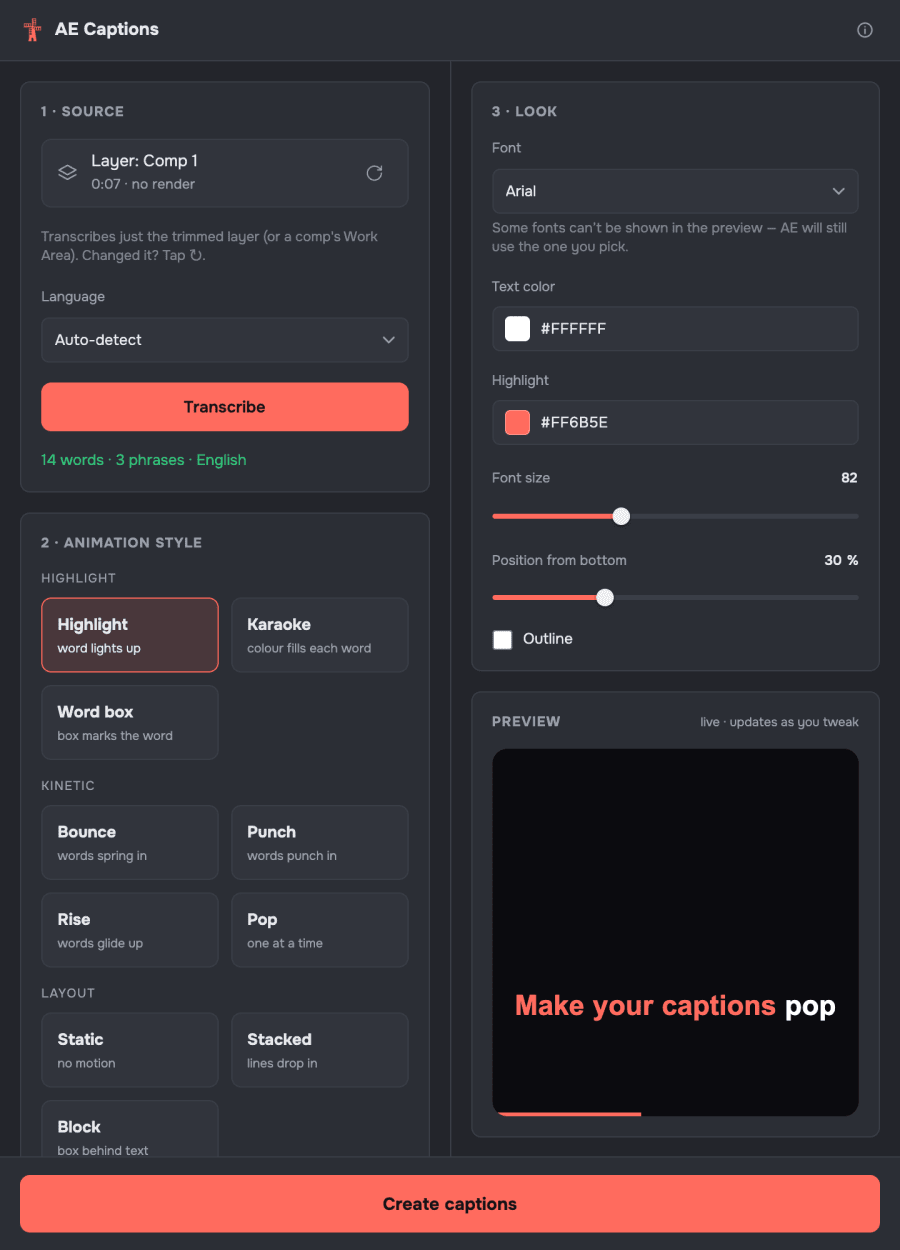
Select the layer with the voice (or a whole comp) and press Transcribe. 43 languages, auto-detected.
Choose one of 10 animation styles, then the font, colours, size and position. The live preview shows it instantly.
Press Create captions: real text layers with keyframes appear in your comp. One undo removes everything.
10 animation styles
Pick the motion, then make it yours
Every style is built from native AE layers and keyframes, so you can retime, recolour or add effects afterwards.
What you get
Built for the way motion designers work
Real text layers and keyframes, no third-party effects. Change the font, add a glow, retime a word: it behaves like your own animation, and the project opens on any machine without the plugin.
Your footage never leaves your Mac. No uploads, no per-minute fees.
Auto-detect, including Arabic, Hebrew, Chinese, Japanese and Thai, laid out correctly.
Correct names and slang in the transcript, and pick key words to emphasize.
No subscription. One license works on 2 computers.
Is it for you?
Made for After Effects people
A great fit if you…
- edit Reels, TikToks or Shorts in After Effects
- caption talking-head or voice-over videos for clients
- want animated captions you can still fine-tune by hand
Not the right tool if you…
- work on Windows or an Intel Mac (Windows version is coming soon)
- edit only in Premiere Pro or CapCut: it lives in After Effects
- just need a plain subtitle file: a free tool will do

Who made this
Hi, I'm Oleksandr
I'm a motion designer and a design team lead. Captions are part of almost every short video now, and keyframing them word by word is the most tedious part of the job. So I built the tool I wanted for my own work.
AE Captions is the first windmillmotion tool, and I keep adding new animation styles.
FAQ
Good questions
How do I install it?
Get the free ZXP Installer, drag the AE Captions .zxp file into it, restart After Effects and open Window › Extensions › AE Captions. Paste the license key from your purchase page and press Activate.
Does it really work offline?
Yes. Transcription runs on your Mac, and your footage is never uploaded. The speech model (about 830 MB) downloads once on first use. The internet is only needed to activate the license and to re-check it about once a month.
What do I need?
After Effects 2022 or newer on macOS 11+ with Apple Silicon (M1 or newer), and about 1 GB of free disk space. A Windows version is coming soon. Intel Macs are not supported.
Can I use it on two computers?
Yes, one license works on 2 computers. To move it, open About (i) › Deactivate this computer on the old one, then activate the new one.
What if it doesn't work for me?
Write to me first, and I'll help. If AE Captions doesn't work on your computer and I can't fix it, you get a full refund within 7 days of purchase.
Is the payment safe?
The checkout is run by BlackSea, a store for digital products, and payments (card, Apple Pay, Google Pay) are processed by a bank. I never see your card details. Your card is charged in Ukrainian hryvnia at the current rate, so your bank statement may show a slightly different amount.
Stop keyframing captions by hand
One-time payment, no subscription. This is the launch price: it goes up as new animation styles are added.